
Have you ever struggled with CSS z-index not working as expected? The secret
lies in understanding stacking contexts - a fundamental CSS concept that
determines how elements overlap. Let's break it down!
What is a Stacking Context?
A stacking context is a conceptual layer system that determines the vertical order of elements. Think of it like a stack of transparent sheets:
1undefinedDefault behavior: Elements stack in this order (from bottom to top):
- Root element (html)
- Non-positioned elements in DOM order
- Positioned elements in DOM order
- Elements with
z-index
Visualizing Stacking Contexts
To better understand stacking contexts, here's a visual representation:
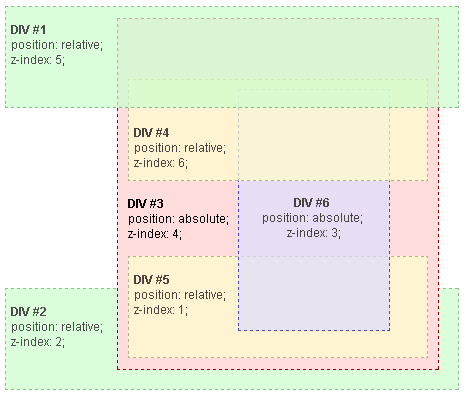
This image illustrates how elements are layered based on their stacking context
and z-index values.
Creating Stacking Contexts
Certain CSS properties create new stacking contexts. Here are common triggers:
1undefinedKey properties that create stacking contexts:
position: absolute/fixedwithz-indexopacity < 1transform(any value except none)filter(non-none values)will-change(certain values)
The Hierarchy Hierarchy
Stacking contexts form a parent-child relationship. Children cannot escape their parent's context:
1undefinedIn this example:
- The lime box (z-index: 2) appears on top
- Red parent (z-index: 1) is below
- Blue child (z-index: 9999) is still under lime box
Why? The child's high z-index only matters within its parent's context (z-index: 1).
Common Pitfalls & Solutions
Problem: "My z-index: 9999 isn't working!" Solution: Check if parent elements create a stacking context with lower z-index.
Problem: Unexpected overlap after adding opacity Solution: Remember
opacity < 1 creates new context!
1undefinedBest Practices
- Minimize z-index usage - Use natural DOM order when possible
- Create clear layers - Use base z-index values (100, 200, etc.)
- Isolate components - Use
position: relativeat component root - Use CSS custom properties for consistent z-index management
1undefinedDebugging Tips
- Chrome DevTools → Elements panel → Check "Stacking Contexts" overlay
- Temporarily add
outline: 1px solid #f00;to visualize boundaries - Use 3D view in browser dev tools to see layers
Understanding stacking contexts will save you hours of layout frustration. Remember: it's not just about z-index, but about the entire layer hierarchy!
Happy coding!